


Labels never grow
Long text is shrunk to fit, and the preview names the rows that were shrunk or shortened, before you print.
TK-02Peelstack Label Maker
Addresses, return labels, jar labels, name badges: pick the code on your label box, check the preview, download a PDF made to the label sheet's published sizes. Inside Google Sheets, no Word, no uploads to our servers.
Free for up to 30 labels per run
Coming soon to the Google Workspace Marketplace
label layouts, each checked against the maker's template
envelope sizes with a return address
writing systems that print correctly
languages in the add-on itself
01How it works
Pick the code on your label box, check the preview, and download a PDF made to the sheet's published sizes.
| A | B | C | D | |
|---|---|---|---|---|
| 1 | Name | Address | City | Postcode |
| 2 | Amelia Hart | 14 Orchard Lane | Springfield | 62704 |
| 3 | Lukas Brenner | 220 Pine Street | Boston | 02134 |
| 4 | 山田 花子 様 | 神宮前1-2-3 | 東京都渋谷区 | 150-0001 |
| 5 | Grace Thompson | Building Seven, 81 Beach Road | Santa Barbara | 93101 |
| 6 | Ελένη Παπαδοπούλου | Οδός Ερμού 25 | Αθήνα | 105 63 |
| 7 | 김민준 님 | 세종대로 175 | 서울특별시 종로구 | 03172 |
| 8 | Иван Петров | ул. Тверская, д. 7 | Москва | 125009 |
| 9 | محمد العلي | شارع الملك فهد 12 | الرياض | 12211 |
| 10 | שרה כהן | רחוב הרצל 10 | תל אביב | 6120101 |
| 11 | 李伟 先生 | 建国路88号 | 北京市朝阳区 | 100022 |
| 12 | प्रिया शर्मा | 12, एमजी रोड | बेंगलुरु | 560001 |
| 13 | สมชาย ใจดี | 99 ถนนสุขุมวิท | กรุงเทพฯ | 10110 |
Illustration with sample data.
5160, 8160, L7160, Zweckform 3475 and more. The sheet is shown so you can compare.
They are guessed from your column names, for example {City}, {State} {ZIP}. Empty lines are left out.
Print at Actual size. Using a partly used sheet? Click the first empty label.
See itA guided tour
Five real screenshots from the add-on, with sample data. Pick a step and the view moves in on the part that matters.
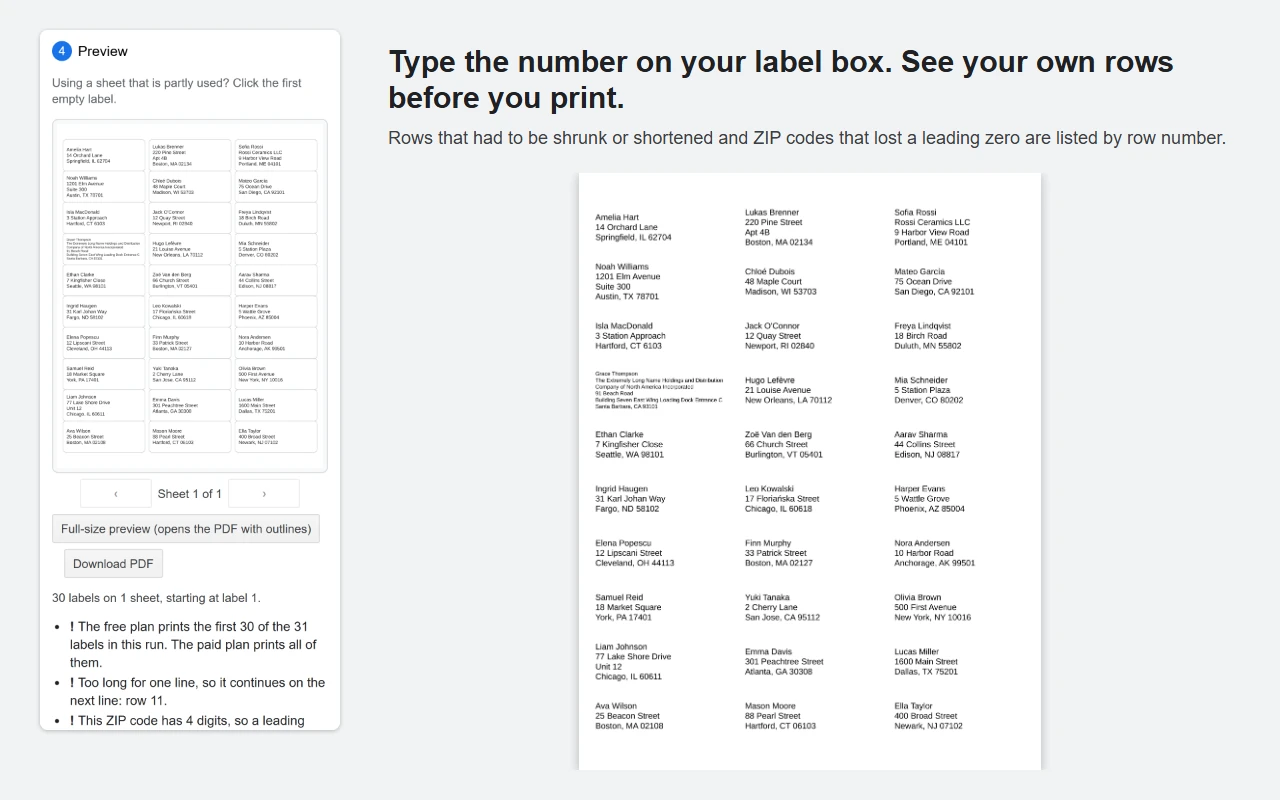
See your own rows before you print. Rows that had to be shrunk or shortened, and ZIP codes that lost a leading zero, are listed by row number.
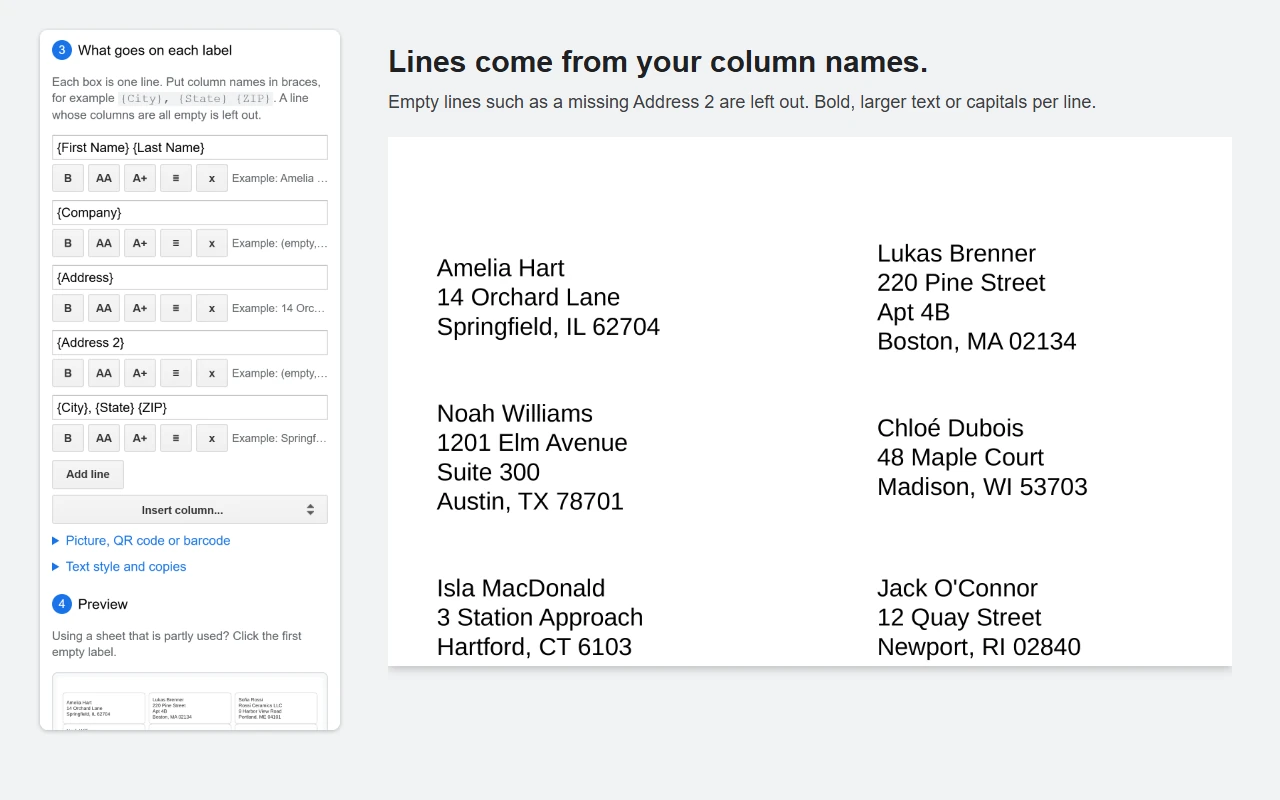
Lines come from your column names. Empty lines such as a missing Address 2 are left out. Bold, larger text or capitals per line.
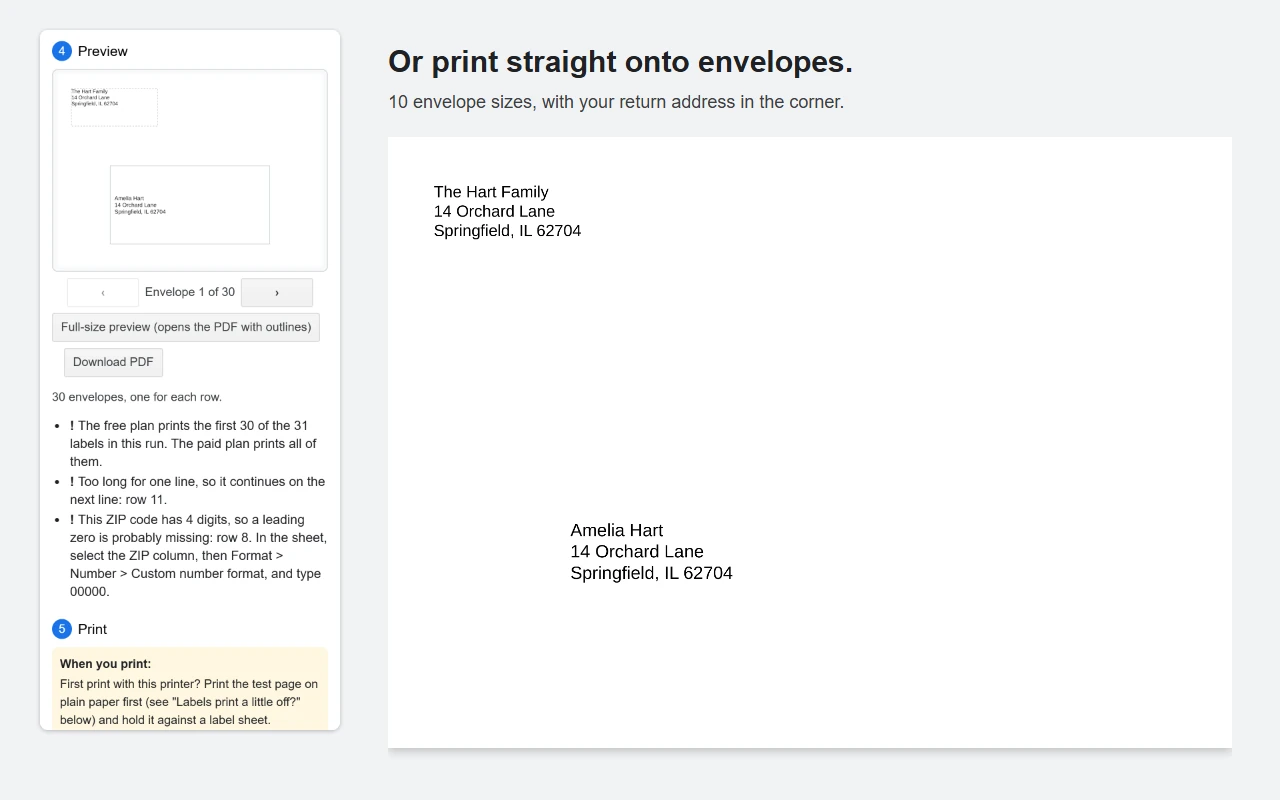
Or print straight onto envelopes. 10 envelope sizes, with your return address in the corner.
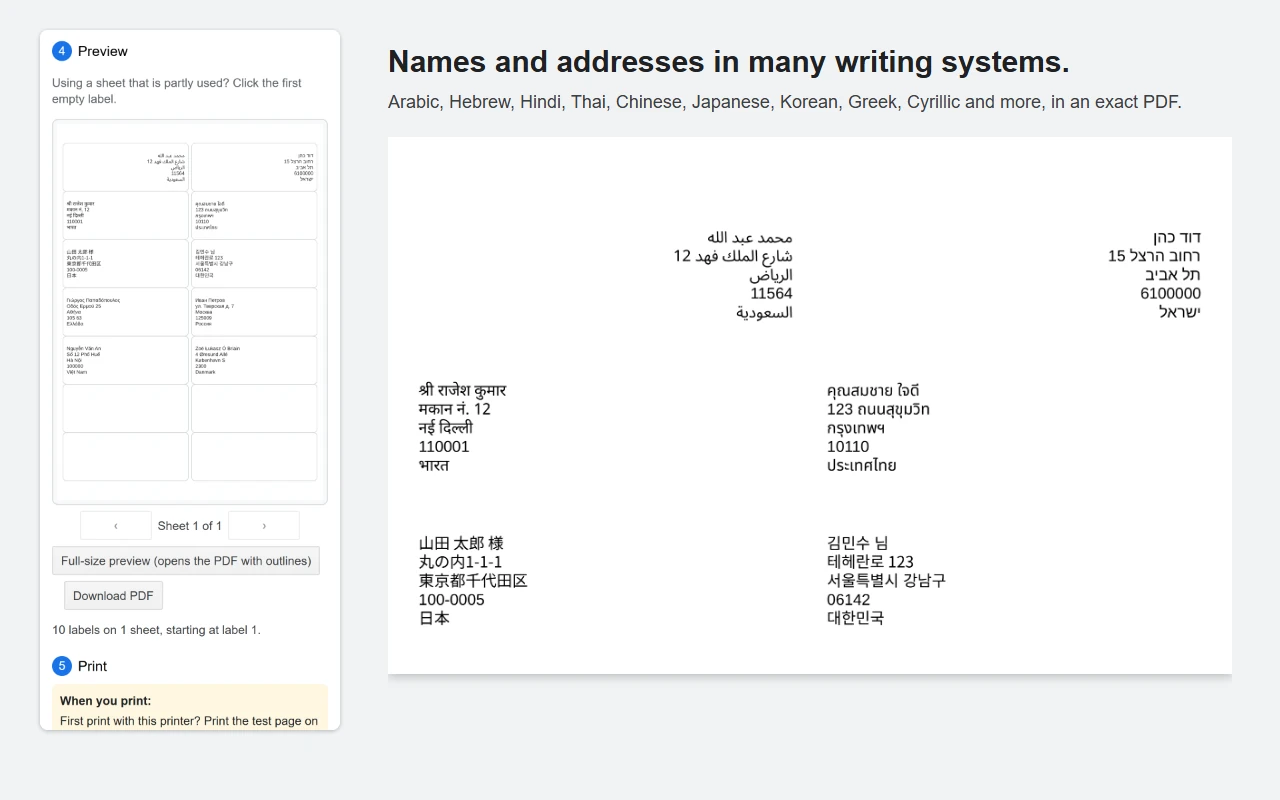
Names and addresses in many writing systems. Arabic, Hebrew, Hindi, Thai, Chinese, Japanese, Korean, Greek, Cyrillic and more, in an exact PDF.
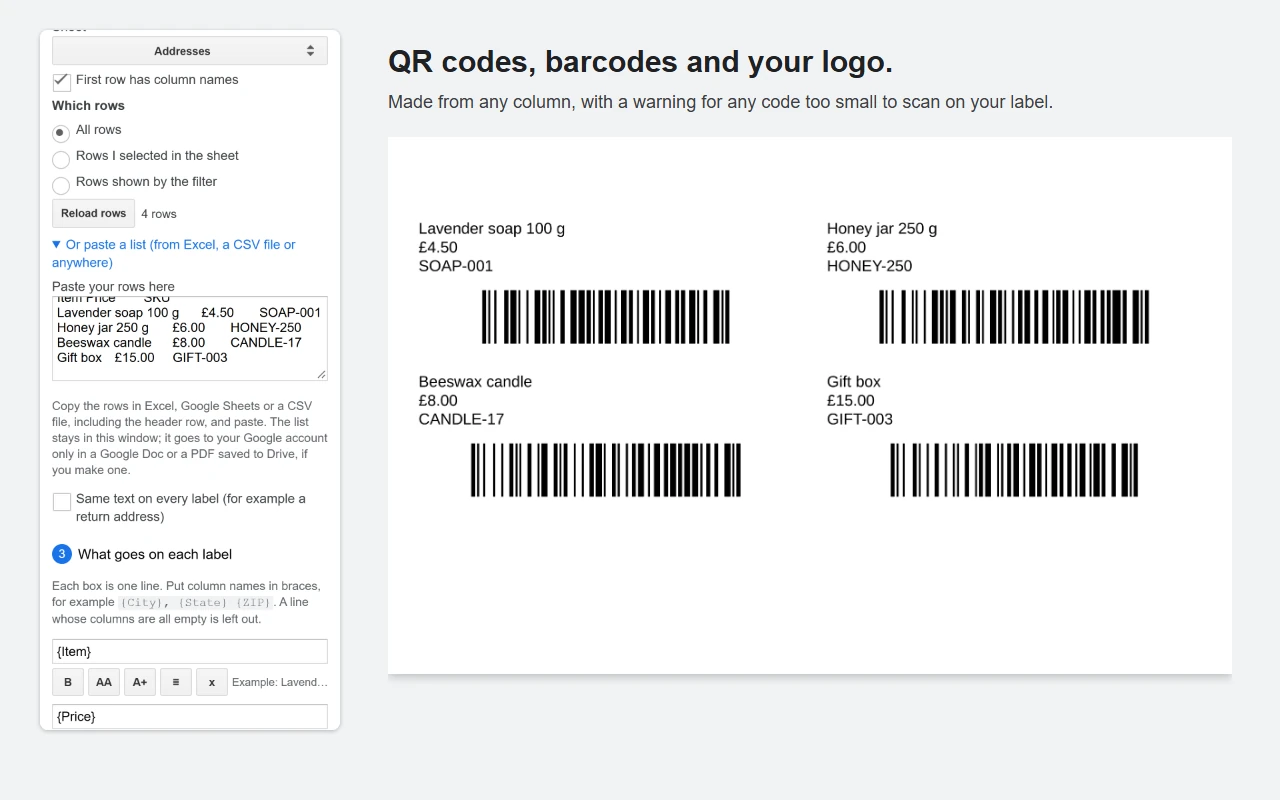
QR codes, barcodes and your logo. Made from any column, with a warning for any code too small to scan on your label.
01Rows that had to be shrunk or shortened, and ZIP codes that lost a leading zero, are listed by row number.
02Features
Long text is shrunk to fit, and the preview names the rows that were shrunk or shortened, before you print.
Made to the manufacturer's published sizes, plus a one time printer offset from a test page.
ZIP codes and dates print exactly as the sheet shows them.
All rows, selected rows or filtered rows. Copies per row, a sheet per row, and starting on a partly used sheet.
QR codes, Code 128, EAN-13 and UPC-A barcodes, and your logo, in the PDF.
#10, #9, #6 3/4, A2, A6, A7, A9, DL, C6 and C5, with a return address.
It reads only the open spreadsheet. Your sheet data never leaves Google and your browser.
03Pricing
Every feature, up to 30 labels per run, one full sheet of Avery 5160. Run it as often as you like.
A longer list prints its first 30 labels on the free plan, and the preview shows exactly those. Test pages are always free.
No 30 label limit for 1 year. Paid once; it does not renew.
No 30 label limit for as long as Peelstack Label Maker is offered. Paid once, no renewals.
Every plan reads up to 10,000 rows of a sheet at a time and makes up to 50,000 labels per run. Prices are in US dollars. No subscription and nothing to cancel. If it does not work for you and we cannot fix it, you get a full refund within 14 days of purchase. See the terms.
04Questions
Sheets from Avery and 13 other brands, among them Avery Zweckform, A-One, HERMA and OnlineLabels: type the code on your box, or see the Label list for every code. 18 US Letter and 20 A4 layouts, plus custom sizes. Taskivator is not affiliated with any of these brands.
No. The Google Sheets and Docs mobile apps do not run add-ons. Use a computer with a desktop browser.
Not yet. It makes a PDF for label sheets that you print on your own printer at Actual size.
There is no trial: the free plan has every feature, for up to 30 labels per run, as often as you like. A paid plan removes the 30 label limit.
05Resources
Support for Peelstack Label Maker: peelstack@taskivator.com
Guides and help